


Maintenance
Version
This article contains information about unreleased content (0.8.9) and its information cannot be verified.
|
Maintenance is an optional feature and is only available when Maintenance is enabled in game settings.
Background
The technical meaning of maintenance involves functional checks, servicing, repairing or replacing of necessary devices, equipment, machinery, building infrastructure, and supporting utilities in industrial, business, and residential installations. Over time, this has come to include multiple wordings that describe various cost-effective practices to keep equipment operational; these activities occur either before or after a failure.
Maintenance is strictly connected to the utilization stage of the product or technical system, in which the concept of maintainability must be included. In this scenario, maintainability is considered as the ability of an item, under stated conditions of use, to be retained in or restored to a state in which it can perform its required functions, using prescribed procedures and resources.
In some domains like aircraft maintenance, terms maintenance, repair and overhaul also include inspection, rebuilding, alteration and the supply of spare parts, accessories, raw materials, adhesives, sealants, coatings and consumables for aircraft maintenance at the utilization stage.
Gameplay
When the player enables Maintenance in the game setting, the player needs to take care of maintaining buildings and vehicles. Workers live and work in buildings and over time these buildings need maintenance because things break down through use of these buildings. The same applies for vehicles. When vehicles are used in the republic for transportation of resources, things break down through use.
When maintenance is not applied in time, buildings start to look decrepit over time and vehicles will look worn out. In the end, when maintenance is not applied, the player has to replace the vehicle or rebuild the building.
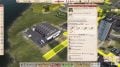
The player must take care of Maintenance by constructing the correct buildings and maintaining the player's buildings and vehicles. To keep buildings in good condition, the construction office takes care of the maintenance. For vehicle maintenance the player has to build the Vehicle repair station.
The Vehicle repair station building needs to be provided with workers, vehicles and resources. When the Vehicle repair station is not yet available in the player's republic or a vehicle is out of range, there is a chance that a vehicle breaks down because it needed to be repaired. The player is penalized for this breakdown: the vehicle will wait and then continue, but the next breakdown will come earlier and last longer.
General
Wear and tear
Buildings and vehicles are subject to wear and tear. This wear and tear is visualized in the game as buildings and vehicles start to look worn out over time. The degree of wear and tear can be retrieved by selecting a building or vehicle and displaying the properties. Wear and tear is shown as a percentage in the buildings and vehicles properties window. Only the percentage is shown for residential buildings, while additional information is available for vehicles, such as the odometer showing the total number of km the vehicle has travelled, and the age of the vehicle, displayed right below the speedometer.
When selecting a factory, additional wear and tear information is displayed about the machines which reside in the factory and also information is displayed about the productivity and efficiency of workers in the factory.
The player can adjust the level of wear and tear before maintenance is applied to a building or vehicle. The wear and tear also applies to machines which reside in factory buildings. When no maintenance is applied to a building or to the machines in a factory building, the player is penalized. The productivity and/or efficiency of a building will decrease or, in the case of a residential building, the quality of the flat will decrease, which has a slight impact on the citizen's happiness.
Connecting Vehicle repair station
The vehicle repair station can be used in two ways:
- Connected via road
- Placing a building close by
There is a downside when using the Vehicle repair station with a road connection only. Some vehicles do not automatically go to a place to be repaired. The user has to select the vehicle and manually send it to a depot in range of the Vehicle repair station.

The player can adjust the Office working range with these settings: <1000 m, <2000 m, or <3000 m. When the player selects the Vehicle repair station and hovers over the Vehicle repair station properties window, the roads and buildings in range of the Vehicle repair station will light up yellow. (See image #1 on the right.)

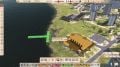
The buildings light up orange when they are in close range of the vehicle repair station, meaning the buildings are connected and repair will take place without service vehicles. (See image #2 on the right.)
Maintenance via road connection
When the Vehicle repair station is connected via road, the Vehicle repair station will send service vehicles to places where maintenance needs to be done. These places can be Train depots, Ship docks, buildings with machines or road vehicles inside buildings, buildings with Helicopter ports like Hospitals and Fire stations. When the repair takes place the vehicle or machine is not available for its task. After repair the machines or vehicles in buildings will continue with their task.
To repair trains and ships via a road connection the player manually needs to send the vehicle to the Train depot or Ship dock. The repair will be executed by the service vehicles from the Vehicle repair station and after repair the player needs to start the vehicle again with its task manually.
Maintenance in range (i.e. close by)
For automatic repair of trains, ships, helicopters and airplanes the Vehicle repair station needs to be placed close by a Train depot, Ship dock, Heliport and/or Airport cargo terminal.


When placing the Vehicle repair station the player should notice the orange dots around the Vehicle repair station. When the orange dots from the Vehicle repair station light up the Train depot, Ship dock, Heliport or Airport cargo terminal in orange, the buildings are connected. (This also works the other way round when placing buildings.) When the dots light up automatic repair is possible. (See image #4 on the right.)
Building maintenance
The player needs to take care of buildings in the republic. When a building is not maintained, it will eventually collapse and need to be reconstructed. The player loses the workers who were living in the residential building or working in the factory; these workers leave the republic. After the building collapses, the player needs to decide whether to reconstruct or demolish it. If the player decides to reconstruct the building, then the reconstruction is handled by the Construction office.
When a building matches the percentage configured for repairing wear and tear, the Construction office will send vehicles to reconstruct the building.
Machines maintenance (in buildings)
Factories are equipped with machines that are also subject to wear and tear. The player needs to take care of maintaining these machines. If no maintenance is applied the productivity of the factory will decrease. Increasing wear and tear will decrease the productivity of the factory over time.
When machines in buildings match the percentage configured for repairing wear and tear, the Vehicle repair station will send service vehicles to repair the machines, when the factory is in range of the Vehicle repair station by a road connection.
Vehicle maintenance
Road vehicles
If no Vehicle repair station is available in the player's republic, road vehicle behavior is as follows:
When the vehicle matches the percentage configured for wear and tear an icon is displayed above the vehicle, stating that the vehicle needs to be repaired. The vehicle will break down but will be able to continue after a couple of days. But continuing will increase the wear and tear and eventually the player will get a penalty. Every time the vehicle breaks down the waiting time increases and the next break down will come earlier. Wear and tear does not affect the functioning of the vehicle.
If no maintenance is applied to the vehicle at all, in the end the vehicle cannot be repaired any more and the vehicle needs to be scrapped by the player, which the player has to pay for.
From the moment a Vehicle repair station is available in the republic, road vehicles that need maintenance drive to the Vehicle repair station. There are limited places available in the Vehicle repair station for road vehicles to be repaired. After repair, the road vehicle continues the task it was working on.
If there are Road vehicles working in buildings, like excavators in a Gravel quarry, and they need repair, the Vehicle repair station will send a service vehicle. Vehicles in buildings are repaired by a service vehicle from the Vehicle repair station, when the factory containing the machines is in range of the Vehicle repair station.
Trains
The player can manually send a train to a Train depot with a Vehicle repair station in range when connected via road. Once it has arrived at the Train depot, the Vehicle repair station will send a service vehicle to repair the train.
Trains can also be repaired automatically. To achieve this the Train depot needs to be placed near a Vehicle repair station. The player should notice the orange dots around the Vehicle repair station. When the orange dots from the Vehicle repair station light up the Train depot in orange, then both buildings are connected with each other. With this setup the trains, which need repairs, drive automatically to the Train depot connected with a Vehicle repair station. Once it has arrived at the Train depot, the train will be repaired and after repair the train will continue with its task.
Ships
The player can manually send a ship to a Ship dock with a Vehicle repair station in range when connected via road. Once it has arrived at the Ship dock, the Vehicle repair station will send a service vehicle to repair the ship.
Another option is that the player can choose to place a Vehicle repair station next to a harbor for automatic repair of ships. When placing the Vehicle repair station the player should notice the orange dots around the Vehicle repair station. When the orange dots from the Vehicle repair station light up the harbor building in orange, then both buildings are connected with each other. In this setup the boats are repaired straight from the Vehicle repair station without sending service vehicles from the Vehicle repair station.
Helicopters
Helicopters can be repaired at workplaces, like the Helicopter construction office, and at places where helicopters can be bought, Heliports. Heliports for cargo connected to warehouses, factories etc. are not suitable for repairing helicopters.
When a helicopter needs repair and is not parked at a Helicopter construction office, but is assigned to a direct line or working on a construction, the helicopter will search for a Heliport which is in range of a Vehicle repair station. The helicopter will fly to that Heliport platform and be repaired by the Vehicle repair station. After repair, the helicopter will return to the direct line and resume the transportation of resources on the line.
A helicopter assigned to a Helicopter construction office can be repaired while remaining parked at the Helicopter construction office. The Vehicle repair station will send a service vehicle to the Helicopter construction office and the helicopter will be repaired. The Helicopter construction office needs to be in range of a Vehicle repair station.
Airplanes
Airplanes can be repaired when a Vehicle repair station is close by. When placing the Vehicle repair station the player should notice the orange dots around the Vehicle repair station. When the orange dots from the Vehicle repair station light up the Airplane parking in orange, then both buildings are connected with each other. In this setup the airplanes are repaired straight from the Vehicle repair station without sending service vehicles from the Vehicle repair station.
Maintenance configuration
The configuration for maintenance can be adjusted at various places in the game:
- List of vehicles and buildings
- Automatic vehicle replacement
- Building properties display
- Vehicle properties display
- Settings in the Construction office
- Settings in the Vehicle repair station
List of vehicles and buildings
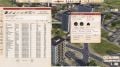
This menu option, available on the left side of the game window, allows the player to select which objects they would like to view in a list. Objects such as road vehicles, trains, ships, airplanes, helicopters, containers, and buildings. A select box is available for displaying the wear and tear or not displaying this information for the selected objects. From here it is also possible to configure the percentage for repair of the selected objects displayed in the list.
Automatic vehicle replacement
The player can observe and set automatic replacements based on wear and tear. The player is able to specify which type of vehicle should replace the older ones, whether it be a new purchase or a depot vehicle.
To control the replacement the game provides checkboxes to identify suitable replacements for old vehicles. At first the game will check if a replacement is available at a Vehicle depot. If none is available the storage for brand new vehicles is checked for a replacement. Only as a last resort a new vehicle will be purchased for replacement.
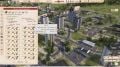
The player has control over the Automatic Vehicle replacement from a button in the menu, which can be found on the left hand side of the game screen. When the player selects that button a window will appear with options.
There are several options:
- Automatic replacement on/off
- Method of replacement:
- From depo
- From vehicle storage
- Purchase new
- Replacement conditions
- Wear and tear in percentages
- Vehicle age
Checking a box makes the option enabled or on and unchecking for disabled or off. Automatic replacement can be enabled by the player by checking the Automatic replacement select box. The player can determine from which source (Vehicle depot, storage, new purchase) the replacement will be delivered by selecting the appropriate checkboxes. For controlling wear and tear and age settings the players presses the Replacement conditions button and a small window appears with two input fields. The player can enter values for percentage wear and tear to replace a vehicle or when the vehicle becomes of a certain age.
Building properties display
When selecting a building a window pops-up. The maintenance information can be found in this window at the item 'Building maintenance'. The quality of flats will go down over time when no maintenance is applied. When the percentage value passes the threshold, the building must be reconstructed.
Maintenance buttons:
- Button for reconstruction, the player needs to press the button to start reconstruction.
To progress of the reconstruction is displayed in the buildings properties window in a progress bar.
Vehicle properties display
When selecting a vehicle a window pops up. In this window information is shown about maintenance. Wear and tear is displayed in a percentage, the total amount of km that the vehicle has ran is displayed under the speedometer and the age of the vehicle is displayed. There is a setting in percentages when to repair the vehicle. This setting can be adjusted by the player by clicking to plus('+') and/or minus('-') signs to increase or decrease the percentage. When the percentage value is exceeded, the vehicle must be repaired.
Maintenance buttons:
- Replace vehicle, the player can manually replace a vehicle by clicking this button, found in the top menu of the vehicle properties window.
- Repair button, toggle: Allow for repair/Don't force repair, the player needs to enable this button for allowing automatic repair for this vehicle.
Construction office
The construction office handles the reconstruction of buildings. Settings for reconstruction can be configured from the construction office properties window.
Maintenance settings for:
- Reconstruction
- Machines replacement
Checking a box for these options makes the option enabled or on and unchecking for disabled or off. Both settings can be adjusted by the player by clicking to plus('+') and/or minus('-') signs to increase or decrease the percentage or clicking on the value will give the player the possibility to enter a number.
When the percentage value is exceeded, the buildings are be repaired. 20% is the lowest value to configure.
Notes
- Wear and tear is not affecting the functioning of a vehicle.
- Service vehicles from the Vehicle repair station don't go to bus stations, end stations and Helicopter cargo platforms.
- Productivity and/or efficiency are influenced by maintenance.
- Cost of maintenance will depend on the type of building, and its current condition.
- Some buildings may experience reduced productivity during the maintenance period.
Vehicle repair stations
| Name | Cost | Workers | Consumption | Production | Lifespan | Energy | Wattage | Storage | Structure | Notes | |
|---|---|---|---|---|---|---|---|---|---|---|---|
 Vehicle repair station (small) |
See below |  15 15
|
 0.30m3/h Water 0.30m3/h Water
|
 0.20kg per worker Mixed waste 0.20kg per worker Mixed waste
|
20 years | 3.4 MWh | 57 kW | 15t  Fuel(import) Fuel(import)3.00t  Plastics(import) Plastics(import)4.2t  Electro components(import) Electro components(import)8.4t  Fabric(import) Fabric(import)6.0t  Mechanical components(import) Mechanical components(import)4.2t  Electronics(import) Electronics(import)20t  Steel(import) Steel(import)20t  Aluminium(import) Aluminium(import)
|
Access | 1x road access 5x footpath access 6x factory connection 2x Parking spot for vehicles |
|
| L/U | 3 | ||||||||||
 Vehicle repair station (medium) |
See below | 30
|
0.60m3/h Water
|
0.20kg per worker Mixed waste
|
20 years | 3.9 MWh | 65 kW | 20t Fuel(import) 6.3t Plastics(import)8.8t Electro components(import)17t Fabric(import)12t Mechanical components(import)8.8t Electronics(import)40t Steel(import)40t Aluminium(import)
|
Access | 1x road access 6x footpath access 7x factory connection 3x Parking spot for vehicles |
|
| L/U | 6 | ||||||||||
 Vehicle repair station (large) |
See below | 80
|
1.60m3/h Water
|
0.20kg per worker Mixed waste
|
20 years | 5.4 MWh | 90 kW | 40t Fuel(import) 10t Plastics(import)14t Electro components(import)28t Fabric(import)20t Mechanical components(import)14t Electronics(import)80t Steel(import)80t Aluminium(import)
|
Access | 1x road access 8x footpath access 8x factory connection 6x Parking spot for vehicles |
|
| L/U | 12 | ||||||||||
Construction
- Vehicle repair station(small)
| Requirements | Groundworks | |||
|---|---|---|---|---|
 429 Workdays 429 Workdays 12t Asphalt 12t Asphalt 45t Concrete 45t Concrete 15t Gravel 6.3t Steel 15t Gravel 6.3t Steel 6.6t Bricks 6.6t Bricks 2.2t Boards 2.2t Boards |  | 240 Workdays 12t Asphalt 20t Concrete 15t Gravel Mechanisms: Excavators (max. 2) Needs workers  (max. 50) |
- Vehicle repair station(medium)
| Requirements | Groundworks | |||
|---|---|---|---|---|
| 854 Workdays 28t Asphalt 87t Concrete 35t Gravel 10t Steel 11t Bricks 3.8t Boards | | 529 Workdays 28t Asphalt 45t Concrete 35t Gravel Mechanisms: Excavators (max. 2) Needs workers (max. 85) |
- Vehicle repair station(large)
| Requirements | Groundworks | |||
|---|---|---|---|---|
| 1816 Workdays 64t Asphalt 183t Concrete 80t Gravel 20t Steel 21t Bricks 7.2t Boards | | 1202 Workdays 64t Asphalt 104t Concrete 80t Gravel Mechanisms: Excavators (max. 3) Needs workers (max. 181) |
Gallery
-
 Truck with visible tear and wear
 -
 Wear and tear visible in building properties
 -
 Building with visible tear and wear
 -
 Garbage trucks displaying increasing visible tear and wear
 -
 Vehicle repair station
 -
 Harbor connecting to Vehicle repair station
 -
 Wear and tear info in List of vehicles and buildings
 -
 Menu Automatic vehicle replacement


