Carriages: Difference between revisions
→Repairing and upgrading carriages: added explanation of the UI in a station |
m →Attaching carriages to the train: replaced redlinks with bold text for Protector and Artillery carriage names. fixed broken link to Map Encounters for Central Station |
||
| Line 12: | Line 12: | ||
[[File:Pre-run carriages button.png|thumb|right|180px|''Carriages'' button at the bottom of the pre-run screen]] | [[File:Pre-run carriages button.png|thumb|right|180px|''Carriages'' button at the bottom of the pre-run screen]] | ||
After ''ANOTHER DAY IN THE FOG,'' the initial train loadout can be configured, including the [[Driver]], [[Locomotive]], '''Carriages,''' and more. The train's loadout can have two carriages behind the locomotive. For example, at the beginning of the game, the train will have the | After ''ANOTHER DAY IN THE FOG,'' the initial train loadout can be configured, including the [[Driver]], [[Locomotive]], '''Carriages,''' and more. The train's loadout can have two carriages behind the locomotive. For example, at the beginning of the game, the train will have the '''Protector''' and '''Artillery''' carriages. | ||
[[File:Swap carriages buttons.png|thumb|right|180px|Swap the selected carriage with the carriage to the left or right, if any]] | [[File:Swap carriages buttons.png|thumb|right|180px|Swap the selected carriage with the carriage to the left or right, if any]] | ||
Once more carriages are unlocked, additional carriages can be purchased with scrap from the [[ | Once more carriages are unlocked, additional carriages can be purchased with scrap from the [[Map Encounters|Central Station]] during the run. At any safe zone, not just the Central Station, the order of carriages may be swapped. | ||
The moment a carriage is added to the train, the default cards are added into the deck. Similarly, if the carriage is removed or sold, all cards associated with that carriage are immediately removed from the deck. | The moment a carriage is added to the train, the default cards are added into the deck. Similarly, if the carriage is removed or sold, all cards associated with that carriage are immediately removed from the deck. | ||
| Line 22: | Line 22: | ||
<gallery widths=360px heights=202 mode="nolines> | <gallery widths=360px heights=202 mode="nolines> | ||
File:Carriages screen protector.png|Protector carriage is in the middle, behind the locomotive | File:Carriages screen protector.png|Protector carriage is in the middle, behind the locomotive | ||
File:Carriages screen artillery.png|Artillery carriage is | File:Carriages screen artillery.png|Artillery carriage is third | ||
</gallery> | </gallery> | ||
Revision as of 03:14, 7 July 2026
Overview
Together, Carriages and the Locomotive make up the train. Carriages automatically add several Cards to the deck that are specific to the abilities of that carriage. Upgrading the carriage allows selecting more cards to add to the deck, and completing a run and Progressing by ranking up a carriage unlocks additional cards—again, specific to the abilities of that carriage.
For example, at the very beginning of the game, before the first run, the train comes with the Artillery carriage. This automatically adds three Artillery Attack cards to the deck. The carriage also comes with three unlocked cards that can be added to the deck when upgrading the carriage during a run, Blow Out, Reload, and Carpet Shot. Finally, finishing a run and ranking up Artillery allows one choice from among the remaining hidden cards to be unlocked and then available to find during upgrades on subsequent runs.
The order of carriages matters significantly during fights.
Some cards directly affect "adjacent" carriages, and the impact range and pushing bandits will consistently affect certain carriages around the carriage with the ability in use. For example, in the train order in the screenshots below, the Artillery can push bandits to the left to go directly behind the train or to the right into the Protector carriage, potentially damaging it.
Attaching carriages to the train

After ANOTHER DAY IN THE FOG, the initial train loadout can be configured, including the Driver, Locomotive, Carriages, and more. The train's loadout can have two carriages behind the locomotive. For example, at the beginning of the game, the train will have the Protector and Artillery carriages.

Once more carriages are unlocked, additional carriages can be purchased with scrap from the Central Station during the run. At any safe zone, not just the Central Station, the order of carriages may be swapped.
The moment a carriage is added to the train, the default cards are added into the deck. Similarly, if the carriage is removed or sold, all cards associated with that carriage are immediately removed from the deck.
-
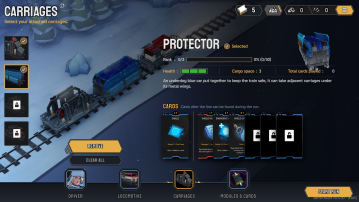 Protector carriage is in the middle, behind the locomotive
 -
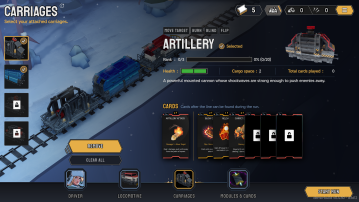 Artillery carriage is third


Repairing and upgrading carriages
During the run, most safe zones allows repairing train units and upgrading carriages. Repairing any damaged train unit costs 30 scrap and restores one health point.
Upgrading also costs scrap. The first upgrade costs 30 scrap, the second 40, and so on, increasing by 10 every upgrade.
Each upgrade rewards a choice of one of three options. If the carriages has been upgraded enough times and all unlocked cards have been added to the deck, then the option instead of a deck card is to receive spikes, the permanent currency (not scrap). Therefore, the options are:
- one unlocked card belonging to the carriage being upgraded
- a second unlocked card, if available
- an instant bonus that is applied immediately:
- Max Health bonus that increases the current and maximum health of the carriage by one (that is, it does not then require repairing)
- Partial Refund that returns 20 scrap just spent on the upgrade
- Driver Gauge Bonus that gives boosts to the number of points added to the Driver Gauge
- Driver Card Bonus that draws two special cards instead of one the next time the Driver Gauge is activated
- Spikes, if no unlocked cards remain
Carriage panel example
Below is a screenshot of a Chop Shop's options for an Artillery carriage. The leftmost green boxes are the current health of the carriage, in this case it has a max health of 2HP and does not need any repairs.
In this example, two out of a total of seven cards, 2/7, belonging to the Artillery carriage are in the deck. So it would take five upgrades to obtain the remaining five cards to have all of the Artillery cards in the deck, assuming a card was selected every time and not a Max Health instant bonus, for example. Note that this is the number of unique cards, not the total number of cards. (The first unique card for this carriage is Artillery Shot, which comes in a stack of 3, so this 2/7 cannot mean the total number of cards.)
The carriage has already been upgraded one time, 1X. It can therefore be determined that the upgrade added the second unique card to the deck, possibly Chain Shot or Blow Out. In other words, the upgrade to 1X brought the unique card number from 1/7 to 2/7. Also, since the carriage has been upgraded once already, the upgrade will cost more than the base cost of 30 scrap.
The rest of the panel shows the following four buttons:
- Show the cards in the deck associated with the Artillery carriage
- Upgrade the carriage for 40 scrap
- Repair the carriage for 30 scrap (disabled because the carriage is at full health already)
- Sell the carriage for 110 scrap (disabled because the train is at a Chop Shop, not the Central Station)
-
 Artillery Carriage in a Chop Shop, showing buttons for upgrading, repairing, and selling the carriage