Carriages: Difference between revisions
→Repairing and upgrading carriages: added explanation of the UI in a station |
Added new Scrap icon to references |
||
| (4 intermediate revisions by the same user not shown) | |||
| Line 1: | Line 1: | ||
[[File:Operator_carriages_tutorial_tip.png|480px|center|Choose up to two carriages to connect to the train. Carriage cards are added to the deck and new ones can be unlocked during a run. Tip: Train length affects hand size, number of cards to choose from and base AP amount.]] | |||
== Overview == | == Overview == | ||
| Line 12: | Line 14: | ||
[[File:Pre-run carriages button.png|thumb|right|180px|''Carriages'' button at the bottom of the pre-run screen]] | [[File:Pre-run carriages button.png|thumb|right|180px|''Carriages'' button at the bottom of the pre-run screen]] | ||
After ''ANOTHER DAY IN THE FOG,'' the initial train loadout can be configured, including the [[Driver]], [[Locomotive]], '''Carriages,''' and more. The train's loadout can have two carriages behind the locomotive. For example, at the beginning of the game, the train will have the | After ''ANOTHER DAY IN THE FOG,'' the initial train loadout can be configured, including the [[Driver]], [[Locomotive]], '''Carriages,''' and more. The train's loadout can have two carriages behind the locomotive. For example, at the beginning of the game, the train will have the '''Protector''' and '''Artillery''' carriages. | ||
[[File:Swap carriages buttons.png|thumb|right|180px|Swap the selected carriage with the carriage to the left or right, if any]] | [[File:Swap carriages buttons.png|thumb|right|180px|Swap the selected carriage with the carriage to the left or right, if any]] | ||
Once more carriages are unlocked, additional carriages can be purchased with | Once more carriages are unlocked, additional carriages can be purchased with {{Scrap}} Scrap from the [[Map Encounters|Central Station]] during the run. At any safe zone, not just the Central Station, the order of carriages may be swapped. | ||
The moment a carriage is added to the train, the default cards are added into the deck. Similarly, if the carriage is removed or sold, all cards associated with that carriage are immediately removed from the deck. | The moment a carriage is added to the train, the default cards are added into the deck. Similarly, if the carriage is removed or sold, all cards associated with that carriage are immediately removed from the deck. | ||
| Line 22: | Line 24: | ||
<gallery widths=360px heights=202 mode="nolines> | <gallery widths=360px heights=202 mode="nolines> | ||
File:Carriages screen protector.png|Protector carriage is in the middle, behind the locomotive | File:Carriages screen protector.png|Protector carriage is in the middle, behind the locomotive | ||
File:Carriages screen artillery.png|Artillery carriage is | File:Carriages screen artillery.png|Artillery carriage is third | ||
</gallery> | </gallery> | ||
== Repairing and upgrading carriages == | == Repairing and upgrading carriages == | ||
During the run, most [[Map Encounters|safe zones]] allows repairing train units | During the run, most [[Map Encounters|safe zones]] allows repairing train units. Repairing any damaged train unit costs 30 {{Scrap}} Scrap and restores one health point. | ||
Upgrading | '''Central Stations''' allow upgrading train units. Upgrading costs 100 {{Scrap}} Scrap. | ||
Each upgrade rewards a choice of one of three options. If the carriages has been upgraded enough times and all unlocked cards have been added to the deck, then the option instead of a deck card is to receive | Each upgrade rewards a choice of one of three options. If the carriages has been upgraded enough times and all unlocked cards have been added to the deck, then the option instead of a deck card is to receive Spikes, the permanent currency (not Scrap). Therefore, the options are: | ||
* one unlocked card belonging to the carriage being upgraded | * one unlocked card belonging to the carriage being upgraded | ||
* a second unlocked card, if available | * a second unlocked card, if available | ||
* an instant bonus that is applied immediately: | * an instant bonus that is applied immediately: | ||
** '''Max Health''' bonus that increases the current and maximum health of the carriage by one (that is, it does not then require repairing) | ** '''Max Health''' bonus that increases the current and maximum health of the carriage by one (that is, it does not then require repairing) | ||
** '''Partial Refund''' that returns 20 | ** '''Partial Refund''' that returns 20 {{Scrap}} Scrap just spent on the upgrade | ||
** '''Driver Gauge Bonus''' that gives boosts to the number of points added to the [[Drivers|Driver Gauge]] | ** '''Driver Gauge Bonus''' that gives boosts to the number of points added to the [[Drivers|Driver Gauge]] | ||
** '''Driver Card Bonus''' that draws two special cards instead of one the next time the Driver Gauge is activated | ** '''Driver Card Bonus''' that draws two special cards instead of one the next time the Driver Gauge is activated | ||
| Line 45: | Line 47: | ||
Below is a screenshot of a Chop Shop's options for an Artillery carriage. The leftmost green boxes are the current health of the carriage, in this case it has a max health of 2HP and does not need any repairs. | Below is a screenshot of a Chop Shop's options for an Artillery carriage. The leftmost green boxes are the current health of the carriage, in this case it has a max health of 2HP and does not need any repairs. | ||
In this example, two out of a total of seven cards, '' | In this example, two out of a total of seven cards, ''1/7,'' belonging to the Artillery carriage are in the deck. So it would take six more upgrades or Chop Shop purchases to obtain the remaining six cards to have all of the Artillery cards in the deck, assuming an Artillery card was selected every time. Note that this is the number of '''unique''' cards, not the total number of cards. (The first unique card for this carriage is '''Artillery Shot,''' which comes in a stack of 3, so this ''1/7'' cannot mean the total number of cards.) | ||
The carriage has | The carriage has not yet been upgraded, ''0X.'' If the next upgrade added a new card to the deck, for example, '''Carpet Shot''' or '''Blow Out,.''' then this would bring the upgrade to ''1X'' and increase the unique card number from ''1/7'' to ''2/7.'' | ||
The rest of the panel shows the following | The rest of the panel shows the following three buttons: | ||
* Show the cards in the deck associated with the Artillery carriage | * Show the cards in the deck associated with the Artillery carriage | ||
* Repair the carriage for 30 {{Scrap}} Scrap (disabled because the carriage is at full health already) | |||
* Repair the carriage for 30 | * Sell the carriage for 100 {{Scrap}} Scrap (disabled because the train is at a Chop Shop, not the Central Station) | ||
* Sell the carriage for | |||
<gallery widths= | <gallery widths=800px heights=176 mode="nolines"> | ||
File:Station carriage panel.png|Artillery Carriage in a Chop Shop, showing buttons for | File:Station carriage panel.png|Artillery Carriage in a Chop Shop, showing buttons for seeing the related cards in the deck and repairing and selling the carriage | ||
</gallery> | </gallery> | ||
{{:List of Carriages}} | |||
Latest revision as of 16:07, 15 July 2026

Overview
Together, Carriages and the Locomotive make up the train. Carriages automatically add several Cards to the deck that are specific to the abilities of that carriage. Upgrading the carriage allows selecting more cards to add to the deck, and completing a run and Progressing by ranking up a carriage unlocks additional cards—again, specific to the abilities of that carriage.
For example, at the very beginning of the game, before the first run, the train comes with the Artillery carriage. This automatically adds three Artillery Attack cards to the deck. The carriage also comes with three unlocked cards that can be added to the deck when upgrading the carriage during a run, Blow Out, Reload, and Carpet Shot. Finally, finishing a run and ranking up Artillery allows one choice from among the remaining hidden cards to be unlocked and then available to find during upgrades on subsequent runs.
The order of carriages matters significantly during fights.
Some cards directly affect "adjacent" carriages, and the impact range and pushing bandits will consistently affect certain carriages around the carriage with the ability in use. For example, in the train order in the screenshots below, the Artillery can push bandits to the left to go directly behind the train or to the right into the Protector carriage, potentially damaging it.
Attaching carriages to the train

After ANOTHER DAY IN THE FOG, the initial train loadout can be configured, including the Driver, Locomotive, Carriages, and more. The train's loadout can have two carriages behind the locomotive. For example, at the beginning of the game, the train will have the Protector and Artillery carriages.

Once more carriages are unlocked, additional carriages can be purchased with  Scrap from the Central Station during the run. At any safe zone, not just the Central Station, the order of carriages may be swapped.
The moment a carriage is added to the train, the default cards are added into the deck. Similarly, if the carriage is removed or sold, all cards associated with that carriage are immediately removed from the deck.
-
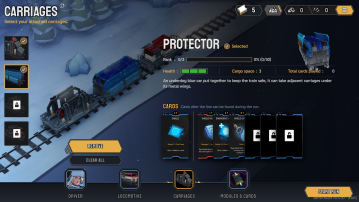 Protector carriage is in the middle, behind the locomotive
 -
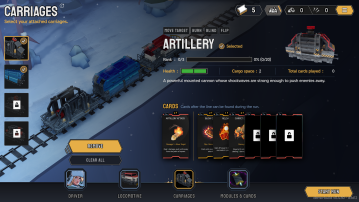 Artillery carriage is third


Repairing and upgrading carriages
During the run, most safe zones allows repairing train units. Repairing any damaged train unit costs 30 Scrap and restores one health point.
Central Stations allow upgrading train units. Upgrading costs 100 Scrap.
Each upgrade rewards a choice of one of three options. If the carriages has been upgraded enough times and all unlocked cards have been added to the deck, then the option instead of a deck card is to receive Spikes, the permanent currency (not Scrap). Therefore, the options are:
- one unlocked card belonging to the carriage being upgraded
- a second unlocked card, if available
- an instant bonus that is applied immediately:
- Max Health bonus that increases the current and maximum health of the carriage by one (that is, it does not then require repairing)
- Partial Refund that returns 20 Scrap just spent on the upgrade
- Driver Gauge Bonus that gives boosts to the number of points added to the Driver Gauge
- Driver Card Bonus that draws two special cards instead of one the next time the Driver Gauge is activated
- Spikes, if no unlocked cards remain
Carriage panel example
Below is a screenshot of a Chop Shop's options for an Artillery carriage. The leftmost green boxes are the current health of the carriage, in this case it has a max health of 2HP and does not need any repairs.
In this example, two out of a total of seven cards, 1/7, belonging to the Artillery carriage are in the deck. So it would take six more upgrades or Chop Shop purchases to obtain the remaining six cards to have all of the Artillery cards in the deck, assuming an Artillery card was selected every time. Note that this is the number of unique cards, not the total number of cards. (The first unique card for this carriage is Artillery Shot, which comes in a stack of 3, so this 1/7 cannot mean the total number of cards.)
The carriage has not yet been upgraded, 0X. If the next upgrade added a new card to the deck, for example, Carpet Shot or Blow Out,. then this would bring the upgrade to 1X and increase the unique card number from 1/7 to 2/7.
The rest of the panel shows the following three buttons:
- Show the cards in the deck associated with the Artillery carriage
- Repair the carriage for 30 Scrap (disabled because the carriage is at full health already)
- Sell the carriage for 100 Scrap (disabled because the train is at a Chop Shop, not the Central Station)
-
 Artillery Carriage in a Chop Shop, showing buttons for seeing the related cards in the deck and repairing and selling the carriage

List of carriages
| Icon | Name | Max rank | Base health | Cargo space | Initially unlocked cards | Requriement to unlock | Text |
|---|---|---|---|---|---|---|---|
 |
Artillery | 2 | 2 | 2 | Artillery Attack Blow Out Reload Carpet Shot |
— | A powerful mounted cannon whose shockwaves are strong enough to push enemies away. |
 |
Protector | 3 | 3 | 3 | Shield Shield Revenge Emergency Shield Shield Siphon |
— | An underdog blue car put together to keep the train safe, it can take adjacent carriages under its metal wings. |
 |
Minigun | 3 | 2 | 2 | Minigun Precision Shot Suppressive Fire Ammo Scavenger |
25 Spikes | A rapid-fire rotary gun, whose hail of bullets destabilizes enemies. |
 |
Harpoon | 5 | 2 | 1 | Harpoon Bolas Chainspike Grappling Hook |
100 Spikes | A product of post-apocalyptic scrappiness, there are very few things that can escape the harpoon's reach. |
 |
Leeter | 4 | 2 | 3 | Take Over Brake Lock Target Hack Power Load |
Destroy 50 enemy units through environmental hazards. | Outfitted with cutting-edge electronics, there is no firewall this carriage can't breach. |
 |
Passenger | 5 | 2 | 4 | ?? | Unlock all Shop Cards. | Transporting people from all walks of life, these passengers are eager to lend their helping hands or sharp tongues. |
 |
Crane | 4 | 3 | 2 | Reposition Crane Help Iron Strike Blue Iron |
Push 75 enemy units into canyon or water. | An old and reliable construction crane that utilizes collected iron. What it lacks in firepower, it makes up in utility. |
 |
Sword | 4 | 3 | 1 | Slice Riposte Anchor Challenger |
Destroy 1500 enemy units. | A surprisingly sharp heaving hunk of metal, the force of this blade is enough to shove enemies aside. |
 |
Tesla Coil | 5 | 2 | 1 | Charge Portable Dynamo Ball Lightning Charged Bolt |
Destroy 200 enemy units by skid damage. | Crackling with tremendous amounts of energy, the lightning emitted by this carriage is capable of jumping to any conductive unit. |
 |
Experiment 52 | 4 | 2 | 3 | ?? | 1000 Spikes | A secret project of the old world. Extremely versatile, advanced and difficult. |