Select which driver will head out on the journey towards the Fog Wall. Each driver has special cards, modules and a way to obtain them during the run.
Overview
Pan "Pathfinder"
Drivers provide unique abilities, to use them you have to fill up the driver gauge, each driver has a unique condition which grants driver gauge points.
Drivers add powerful passive and active abilities to the player's options. Drivers add a Module to the train to give a passive buff during every fight, from the very beginning of the run. And drivers offer one of a few powerful cards to play every time their Driver Gauge fills up.
Driver Gauge
Every driver has a different way to fill their gauge through different player actions, and their gauges require a different number of points to fill. For example, Monica's driver gauge fills up one point for every point of damage dealt to other units, up to 20.
When the gauge fills, the Activate button becomes enabled. Clicking this places a randomly selected card in the player's hand from the driver's set. This card then behaves like any other card and will be discarded at the end of the player's turn. To get another driver card, the gauge must be filled again.
Driver Bonuses
When upgrading carriages, a driver bonus frequently appears as an option alongside the carriage's cards. These Instant rewards are neither cards nor modules, but are one-time bonus effects applied to the driver that affects their gauge and driver cards.
Every train has to have an engine at the front. They differ in their max health, cards they add to the deck and possible modules that passively affect the run.
Overview
The Locomotive leads the train with Carriages behind. The run is over if the locomotive is destroyed.
Locomotives can only be upgraded at Old-Timer's Stops.
Choose up to two carriages to connect to the train. Carriage cards are added to the deck and new ones can be unlocked during a run. Tip: Train length affects hand size, number of cards to choose from and base AP amount.
Overview
Together, Carriages and the Locomotive make up the train. Carriages automatically add several Cards to the deck that are specific to the abilities of that carriage. Upgrading the carriage allows selecting more cards to add to the deck, and completing a run and Progressing by ranking up a carriage unlocks additional cards—again, specific to the abilities of that carriage.
For example, at the very beginning of the game, before the first run, the train comes with the Artillery carriage. This automatically adds three Artillery Attack cards to the deck. The carriage also comes with three unlocked cards that can be added to the deck when upgrading the carriage during a run, Blow Out,Reload, and Carpet Shot. Finally, finishing a run and ranking up Artillery allows one choice from among the remaining hidden cards to be unlocked and then available to find during upgrades on subsequent runs.
The order of carriages matters significantly during fights.
Some cards directly affect "adjacent" carriages, and the impact range and pushing bandits will consistently affect certain carriages around the carriage with the ability in use. For example, in the train order in the screenshots below, the Artillery can push bandits to the left to go directly behind the train or to the right into the Protector carriage, potentially damaging it.
Attaching carriages to the train
Carriages button at the bottom of the pre-run screen
After ANOTHER DAY IN THE FOG, the initial train loadout can be configured, including the Driver, Locomotive, Carriages, and more. The train's loadout can have two carriages behind the locomotive. For example, at the beginning of the game, the train will have the Protector and Artillery carriages.
Swap the selected carriage with the carriage to the left or right, if any
Once more carriages are unlocked, additional carriages can be purchased with Scrap from the Central Station during the run. At any safe zone, not just the Central Station, the order of carriages may be swapped.
The moment a carriage is added to the train, the default cards are added into the deck. Similarly, if the carriage is removed or sold, all cards associated with that carriage are immediately removed from the deck.
Protector carriage is in the middle, behind the locomotive
Artillery carriage is third
Repairing and upgrading carriages
During the run, most safe zones allows repairing train units. Repairing any damaged train unit costs 30 Scrap and restores one health point.
Central Stations allow upgrading train units. Upgrading costs 100 Scrap.
Each upgrade rewards a choice of one of three options. If the carriages has been upgraded enough times and all unlocked cards have been added to the deck, then the option instead of a deck card is to receive Spikes, the permanent currency (not Scrap). Therefore, the options are:
one unlocked card belonging to the carriage being upgraded
a second unlocked card, if available
an instant bonus that is applied immediately:
Max Health bonus that increases the current and maximum health of the carriage by one (that is, it does not then require repairing)
Partial Refund that returns 20 Scrap just spent on the upgrade
Driver Gauge Bonus that gives boosts to the number of points added to the Driver Gauge
Driver Card Bonus that draws two special cards instead of one the next time the Driver Gauge is activated
Spikes, if no unlocked cards remain
Carriage panel example
Below is a screenshot of a Chop Shop's options for an Artillery carriage. The leftmost green boxes are the current health of the carriage, in this case it has a max health of 2HP and does not need any repairs.
In this example, two out of a total of seven cards, 1/7, belonging to the Artillery carriage are in the deck. So it would take six more upgrades or Chop Shop purchases to obtain the remaining six cards to have all of the Artillery cards in the deck, assuming an Artillery card was selected every time. Note that this is the number of unique cards, not the total number of cards. (The first unique card for this carriage is Artillery Shot, which comes in a stack of 3, so this 1/7 cannot mean the total number of cards.)
The carriage has not yet been upgraded, 0X. If the next upgrade added a new card to the deck, for example, Carpet Shot or Blow Out,. then this would bring the upgrade to 1X and increase the unique card number from 1/7 to 2/7.
The rest of the panel shows the following three buttons:
Show the cards in the deck associated with the Artillery carriage
Repair the carriage for 30 Scrap (disabled because the carriage is at full health already)
Sell the carriage for 100 Scrap (disabled because the train is at a Chop Shop, not the Central Station)
Artillery Carriage in a Chop Shop, showing buttons for seeing the related cards in the deck and repairing and selling the carriage
By using the carriage cards during the run you unlock new cards for that specific carriage. Tip: Low AP cost cards can be played more often.
Overview
A hand of four cards, 2 Red, 1 Blue, 1 Yellow
Cards are what players interact with most frequently. They allow the player to deal damage, protect their train, and control the fight in a variety of ways.
Every card is associated with the locomotive or one of the Carriages. They represent that train unit's abilities, so the player must add that unit to the train at the start of or during the run in order to have access to any of its cards. And if a train unit is lost during a run, that carriage's cards are lost.
At a glance, players can determine the category of a card's effect by its border color:
Blue cards apply defenses to the train.
Red cards are offensive, damaging or impairing enemy units.
Yellow cards affect initiative, the grid, the player's hand, Action Points, or enemy units in non-damaging ways.
At the beginning of every turn, the player draws cards from their Deck to fill their hand. At the very beginning of the game with the default train, the player's hand size is four cards. The player's hand size can be upgraded via modules. Most cards are played exactly once during a turn and then discarded. Discarded cards make their way back to the Draw pile to be drawn into the player's hand at a later turn. Many cards allow the player to draw extra cards in the middle of a fight, and this can be done regardless of the player's hand size. At the end of every player's turn, their entire hand is discarded.
Players do not need to count cards. At any time, the player can view all the cards in their Deck, the Draw Pile, the Discard Pile, etc. These views do not show the player the order in which cards will be drawn, but this information may be crucial in some situations.
Draw Pile at the bottom left
Deck at the top of the screen
Exhaust Pile at bottom right
Discard Pile right next to it
Action Points and playing cards
5 AP currently; 5 normally expected per turnArtillery Attack requires 2 AP
Cards are played by spending their Action Points (AP) listed above the card with the lightning bolt icon. For example, the card Artillery Attack requires 2 AP. At the beginning of a run, the player has 5 AP per turn. Many cards award the player extra AP, so players frequently will have more than their normal expected AP during a turn. In the screenshot, 5/5 means 5 AP left this turn (top) out of 5 AP normally expected each turn (bottom).
When not enough Action Points are left to play a card, the AP number and icon will turn red. Clicking on a card that costs too many AP will show the message Not enough AP and prevent the player from playing that card.
Clicking a card will either immediately play it or show a preview of the effect. For example, a red card with a targeting range will allow the player to target an enemy unit or grid space. Clicking again then plays the card.
Effects that change their own AP cost
Cost Up
This card's AP cost increases by 1 each time another card is played.
Cost Down
This card's AP cost decreases by 1 each time another card is played.
Many cards have the effect Cost Down or Cost Up on them. When these cards are in the player's hand, every other card played in that turn will lower or raise the AP cost of that card, respectively. Therefore, Cost Up cards are best played at the beginning of the turn, and Cost Down cards are best played once their AP cost has reached 0. For example, Shield has the Cost Down effect, making it appropriate for a player to leave it for last after doing everything else they can to avoid taking damage.
Charged
This card's AP cost and power is equal to your current AP.
Cards with the Charged effect will consume all remaining AP in a turn in order to boost its power. For maximum effect, Charged cards are best played at the beginning of a turn or after other cards that increase the player's current AP.
Inflation
This card's AP cost increases by 1 each time this card is played.
For the duration of a fight, cards with the Inflation effect will get more expensive every time they are played. Its cost can exceed the normal AP each turn gets.
Exhaust effect
Exhaust
Card is sent to the exhaust pile until the end of the fight.
Cards played with the Exhaust effect are placed out of play in the Exhaust Pile until the end of the fight. Unlike other cards that go to the Discard Pile, cards in the Exhaust Pile are not recycled into the Draw Pile to be drawn again into the player's hand. These cards are generally much more powerful.
Some cards, for example Into the Furnace and Out of the Furnace take another card from the player's hand with them to the Exhaust Pile as part of their cost. Both cards will then be out of play until the next fight.
Target and impact ranges
Artillery Attack's targeting pattern
Most cards that affect units will have limitations on which units it can affect based on where the unit is relative to the carriage in the grid.
For example, Artillery Attack can reach most grid cells that are not adjacent to the Artillery carriage. The carriage is at the center of the range pattern, where the brighter lines intersect. The horizontal brighter line represents the track, and the locomotive will be to the right of the carriage.
Other cards' ranges do not reach as far as Artillery Attack, have bigger or smaller blind spots, can reach enemies that are closer, or have entirely different patterns. For example, the cards Intent Button,Carpet Shot, and Suppressive Fire can only target enemies aligned vertically with their respective carriage, with no range to the left or right.
Some fights do not have large enough grids to see the entire targeting pattern. This can happen when the maneuverable track is short or when the carriage is too far left or right on the track (horizontally), when there is a cliff or canyon (vertically), or during smaller fights earlier in the run where the grid is smaller by default.
Impact Range
Carpet Shot's target and impact range
Cards that affect more than one grid cell have an Impact Range,Explosion Range, or similar grid on their card back separate from the Targeting Range.
All damage and effects happen to all cells in the impact range equally.
For example, although Carpet Shot can only shoot straight up and down from the Artillery carriage, it hits 3 cells in a line parallel to the train. Therefore, it hits any enemies that are just to the left and right of the vertical targeting line, even though it cannot directly target those grid cells.
Card modifications
Carpet Shot card showing a modifiable value in green.
Many cards have modifiable values, and all cards' AP costs can be modified. Modifiable values appear in green in the card's text.
When completing a fight with the Card modification reward bonus, the player is shown three randomly selected cards from their deck with random modifications applied to them. Modifications are diverse: Some are more powerful than others, and some are exceptionally good for certain runs or in combination with other cards in a situation.
AP cost down
Damage up
Damage up and AP cost up
Added effect, for example Exhaust or Blind
Random AP cost
Numbers in plain gray in the card's text cannot be modified. For example, Carpet Shot is never modifiable to hit any more or less than 3 cells in a line.
Some cards can wind up having random modifiers that cancel each other out, for example a card that adds 1 AP increasing to 2 but also increasing its cost by +1 AP. Other modifications can make cards objectively worse, for example by giving a random AP cost to a card with a base cost of 0.
Minigun modified to add +1 Damage, but adding the Exhaust effect.
Minigun modified to add the Sabotage effect, but increasing its cost by 1.
Adding cards during a run
The run starts with a specified set of unlocked and available cards in their pool based on their chosen Locomotive and Carriages. During the run, the player may be rewarded with or purchase additional cards from this pool. When that happens, the player is given a random selection of cards from the pool to add to their deck.
Reward for winning a fight: Choose one of three random cards.
Upgrading a carriage: Choose one of three random cards associated with that carriage.
Shopping at Chop Shops: Purchase any of several randomly chosen unlocked cards with Scrap—with the option to purchase rerolls with Scrap.
Green dots on the map that offer Card duplication reward: Choose any one card from the deck to duplicate.
When adding cards during a run, the preview of the card includes a stack size in a box in the top left, for example x2. This is how many cards are added for the purchase price. Many cards, especially red cards, come in pairs. For example, in the screenshot of the Carpet Shot card, above, the 2x in the corner means two Carpet Shot cards will be added to the deck.
When upgrading a carriage, it is possible to acquire all the unlocked cards for that carriage. In that situation, the upgrade reward options will be Spikes bonuses or Driver Gauge bonuses instead of more cards.
Every run, the player must re-acquire cards from their pool into their deck.
Winning a basic fight rewards a card.
Cards added this way can belong to any train unit.
Upgrading a carriage rewards a choice of random cards from the pool (or an instant health upgrade).
Random cards for sale at a Chop Shop.
Duplicating a card as a random green-dot reward.
Progression across runs
Modules & Cards button at the left of the pre-run screen
Before starting a run, players may review their currently available modules and cards and may pay Spikes to unlock new ones. Unlocked cards are then made available to be added to the deck during the run when completing fights or purchasing cards from Chop Shops.
After ANOTHER DAY IN THE FOG, players are shown their Locomotives, Carriages, Modules & Cards, and the button to start the run. Once the run begins, the card pool is set for the remainder of the run.
The Driver's cards are not in the pool or ever in the player's deck, but become playable through the Driver Gauge mechanic.
Each locomotive and carriage has a beginning loadout of cards. A small number of cards are immediately in the deck upon starting the run. Others are initially shown with a lock icon and must be unlocked by completing runs to increase the rank of the unit. Ranking up the unit unlocks these extra cards, which are then added to the pool to find during a run.
For example, the Artillery Attack card is always in the deck when the Artillery carriage is on the train, but the Carpet Shot card must be found during the run, and the carriage has three more cards that can be unlocked by ranking up the carriage.
As another example, the Protector carriage adds two Shield cards to the deck when attached to the train. Three other cards are added to the pool to be found during the run, and three more cards can be unlocked by ranking up the carriage.
As a counter example, the Foggie locomotive's unlocks from ranking up are Modules, not cards. Compare the screenshots of the initial loadouts of these three units at the very beginning of the game, before any runs.
Artillery carriage deck cards, pool cards, and unlockable cards.
Protector carriage deck cards, pool cards, and unlockable cards.
Foggie locomotive pool cards and unlockable modules.
Deactivating a Card
On the Modules & Cards screen, additional cards beyond the Base Tier are revealed and unlocked in tiers. Once a card has been unlocked, it is guaranteed to be in the pool. If the player changes their mind, they may Deactivate a card. The choice to deactivate a card is only available once an entire tier has been unlocked. After unlocking all four cards in a tier, the player receives two deactivation options.
Deactivating a card is beneficial when the card conflicts with the player's chosen loadout of locomotives, carriage, and other cards. It also serves to increase the likelihood of finding the other cards in the pool.
Cards available to be unlocked before a run
Unlocked cards can be deactivated
Once deactivated, the card icon in the tier list changes
A deactivated card can be activated again with the Activate button
List of Effects
There are many effects that buff the player's units, debuff enemy units, or change the playing field. Every effect is described in-game; a tooltip will appear over the card after a short delay. For additional descriptions of the effects and interactions, find the article on the specific card.
! Name
Turns
Text
Exhaust
Card is sent to the exhaust pile until the end of the fight.
Move Target
Move affected units away from the carriage.
Cost Down
This card's AP cost decreases by 1 each time another card is played.
Cost Up
This card's AP cost increases by 1 each time another card is played.
Flip
1
Flip the unit's intent.
Blind
1
Blinded units cancel their intent. They move and create intents randomly while blinded.
Burn
1
Burning units take 1 damage at the end of their turn.
Innate
Guaranteed to be drawn first at the beginning of a fight.
Destabilize
1
If this unit receives damage, it will skid one cell backwards. Does not work on Heavy units.
Ignore Shield
Action will ignore shield.
Sabotage
1
This unit receives 1 damage the next time it moves.
Speared
1
If this unit is damaged, draw a Spearwall card from the draw or discard pile.
Inflation
This card's AP cost increases by 1 each time this card is played.
Charged
This card's AP cost and power is equal to your current AP.
Brittle
This card is destroyed when leaving the hand
List of Cards
Base Tier Cards
Icon
Name
AP Cost
Stack Size
Effects
Text
Scrap cost
Breakfast
1
1
Exhaust
Gain 3 extra AP next turn.
81–123
Hand Throw
1
1
Exhaust
Discard all cards in your hand, then draw as many cards.
73–123
Waste Not
0
1
None
Discard the rightmost card in your hand, gain 1AP, draw 1 card.
71–91
Emergency Brakes
0
1
None
Move back by 1 the next time you play a red card this turn.
68–126
Picky Jester
1
1
None
Draw 2 cards, discard 1 card.
93–99
Pre-empt
0
1
Exhaust
Gain 2AP. Start next round with 2AP less.
121–174
Emergency Coal
0
1
None
Move forward by 1 the next time you play a red card this turn.
66–91
Hot Cask
4
1
Cost Down
Draw 2 cards.
64–98
Into the Furnace
0
1
Exhaust
Exhaust one card from hand to gain 2AP.
101–198
Mastermind
1
1
None
Pick 1 card from the draw pile to move to the top of the pile.
177–229
Lane Call
2
1
Exhaust
Decrease all environmental hazard counters by 1 or spawn a new one if there are none.
102–154
Out of the Furnace
0
1
Exhaust
Exhaust one card from hand, add AP equal to the exhausted card's AP cost.
Modules act as modifiers to your run. Some are passive and active at all times, others need a certain amount of specific actions to trigger. Tip: The number of actions necessary will be visible on the module icon on the left side of the screen.
Overview
Ice Pillar Module
Modules are semi-permanent items that give passive perks, options, conditional rewards, and other bonuses for the duration of the run.
Unlike Cards, modules do not go into the player's hand to be played during a turn. Instead, modules are activated immediately once chosen or awarded during a run for the remainder of the run. Note that, many modules have conditions that must be met before their bonuses take effect. When choosing a module, it's important to understand how frequently or infrequently these conditions are likely to happen given the carriages, cards, and other modules the player expects to have during a fight.
For example, the first module seen in the game, Ice Pillars, comes with the first available Driver. This module is therefore already activated at the beginning of the player's first run. Its effect happens immediately, because its condition is "at the start of every fight." Therefore, at the start of every fight, an environmental hazard is spawned.
Modules persist between fights. At the end of a run, the player loses all modules (except the Driver's innate module), and they must be found again during each run before they can be activated.
For players coming from other deckbuilder games, modules are similar to relics.
Obtaining during a run
There are two ways of adding modules to your train during your run.
Convoys
Convoy encounter on the map
A random module can be acquired for free by destroying the Convoy Van of a Convoy. As one of the rewards after finishing that fight, a choice of one of three modules is offered, with a rare chance of offering a choice from four. Clicking one will immediately add it to your train.
Rewards for defeating a Convoy and destroying the Convoy Van
Random module choices after destroying a Convoy Van
Chop Shops
Chop Shop on the map
Chop Shops have a random selection of three modules for sale for Scrap. Players may purchase any number of these for various amounts of Scrap. Players may also pay 30 Scrap to reroll for a new random selection. The Scrap price for a module depends on its rarity and therefore power. The rare module in the screenshot cost 160 Scrap.
Random modules for sale at a Chop Shop
Progression across runs
Modules & Cards button at the left of the pre-run screen
Before starting a run, players may review their currently available modules and cards and may pay Spikes to unlock new ones. Unlocked modules are added to the pool, so that during the run when earning or purchasing a new module, the unlocked module may be a random option.
After ANOTHER DAY IN THE FOG, players are shown their Driver, Locomotives, Carriages, Modules & Cards, and the button to start the run. Once the run begins, the module pool is set for the remainder of the run.
Deactivating a module
On the Modules & Cards screen, additional modules beyond the Base Tier are revealed and unlocked in tiers. Once a module has been unlocked, it is guaranteed to be in the pool. If the player changes their mind, they may Deactivate a module. The choice to deactivate a module is only available once the entire tier has been unlocked. After unlocking all four modules in a tier, the player receives two deactivation options. Unlocking all in the second tier grants two additional deactivation options, and so on. For example, in the screenshot below, two tiers are fully unlocked, so there are up to 4 deactivations possible.
Modules available to be unlocked before a run
Unlocked modules can be deactivated
Once deactivated, the module icon in the tier list changes
A deactivated module can be activated again with the Activate button
List of modules
Driver innate modules
Icon
Name
Text
Driver
Ice Pillar
Spawn an Ice Pillar environmental hazard at the start of every fight.



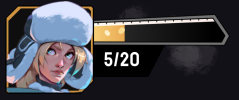 Driver Gauge filling, 5/20.
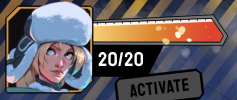 Driver Gauge full, 20/20.
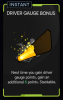 Driver Gauge Bonus carriage upgrade reward.
 Driver Card Bonus carriage upgrade reward.