


Buildings
Overview

The pirate haven begins with a Pirate Camp and a starter Shipwreck with some basic supplies. Expand by adding buildings that grow, produce, and assemble the Upkeep Resources needed to sustain the haven and its fleet of Ships and provide housing.
Every building must be placed within reach of a Pirate Camp, and each building's workers are housed and supplied by that Pirate Camp. Resources can be transported in from anywhere around the island (for example, if another camp produces excess Stew), but a pirate must be fed from the Galley in their Pirate Camp.
Buildings must be connected to the pirate haven with the Connections like roads, rope bridges, cliff paths, and ladders. Construction can't start until the connection is made, and the building must stay connected to operate. There are only a few buildings that do not require any connection.
Most buildings require a certain number of workers and will not function if there are not enough Drifters available on the island. Buildings cannot be partially staffed.
Buildings can be switched off at any time to allow their workers to work elsewhere or to control the flow and consumption of resources around the island.
Production and Drain
Buildings that grow, produce, or assemble goods have a maximum rate of production, shown at the center of the progress wheel in the building's information display. For example, a Woodcutter's maximum production rate is 8 Hardwood per minute. If the building requires input resources that are scarce or have to be transported from far away, the building will not produce at its maximum rate.
Every product from a building goes into its own internal output storage (shown as a large resource icon on the information display with the current value and a blue meter showing how full the output storage is). The recent rate of production vs. consumption or fetching for transportation may mean that storage is increasing or decreasing. This calculation is called Drain and represents whether that building is meeting needs.
A building's drain increases when Fetchers are added elsewhere to pick up its resources. Depending on how long it takes the fetchers to get to the building, the drain may or may not increase significantly. When drain exceeds production for an essential resource, it may be necessary to add another of the same building. This is an opportunity to examine transportation routes to determine where another building could increase efficiency of the overall supply chain.
Fetchers
Buildings that produce goods from other goods require Fetchers, pirates who work to transport goods from one building to another, one way. Every route requires its own assigned Fetcher.
Input storage is shown above the production display. Clicking an input resource and clicking the resource icon above the building producing that resource will assign a new Fetcher.
Buildings that require input goods will stop functioning when their input storage is empty. If this is because the Fetcher is waiting at the source building and no new production is happening there either, the link icon will change to a red hourglass indicating that there is a problem with the supply chain.
-
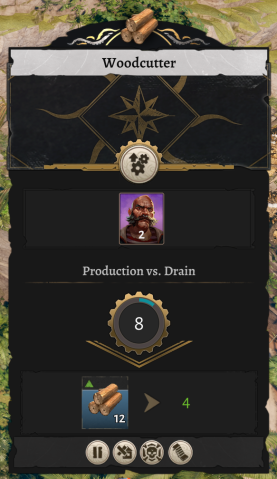 Woodcutters require 2 workers and produce 8 Hardwood per minute. This one has 12 waiting to be picked up and is being drained by 4 per minute.
 -
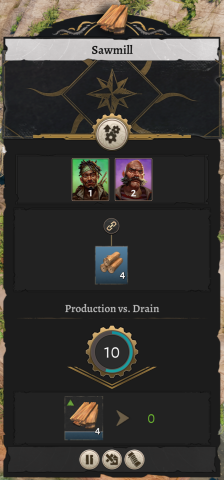 This new Sawmill is bringing Hardwood from one Woodcutter (one Fetcher and one link icon). There hasn't been any recent pickup, so output storage is not yet full and drain is zero.


Transport routes
Most buildings connected to others in a supply chain, with producers and consumers. When deciding where to add a new building, it is important to consider the efficiency of the routes. Efficiency of current fetchers' transport routes is visible as green yellow, and red (default colors) lines indicating high, medium, and low efficiency, respectfully. Alleviating low efficiency routes with a new building can make a significant difference in sustaining upkeep.
If the route lines are difficult to see, clicking on the link icon will emphasize that specific route with a bright, dynamic highlighting. This is useful for avoiding disconnecting the wrong route.
-
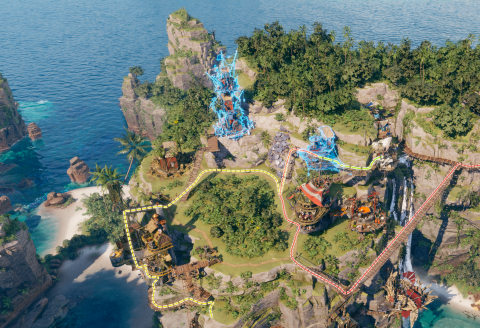 A high-efficiency route in green, medium-efficiency route in yellow, and low-efficiency route in red.
 -
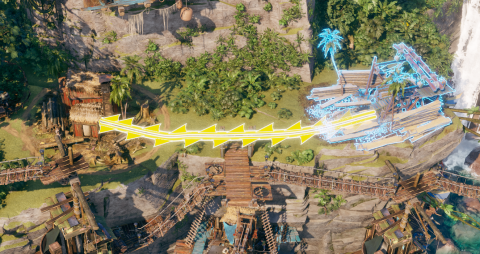 The selected route emphasized by clicking on the link icon in the building's panel.


Community Buildings


Housing Buildings
| Icon | Name | Capacity | Unlock Requirement | Building Cost |
|---|---|---|---|---|
 |
Classy Cabin | 12 | 3  Notoriety Notoriety |
5  Coins Coins10  Stone Blocks Stone Blocks
|
 |
Salty Cabin | 8 | 3  Seafaring Seafaring |
10  Planks Planks15  Rope Rope
|
 |
Tent | 2 | 2 Planks
| |
 |
Fancy Cabin | 12 | 3  Wealth Wealth |
12 Coins
|
 |
Classy House | 25 | 7 Notoriety |
10 Coins 25  Tabby Tabby
|
 |
Bloody Cabin | 8 | 3  Empire Empire |
30 Stone Blocks
|
 |
Bloody House | 20 | 7 Empire |
30 Tabby
|
 |
Salty House | 20 | 7 Seafaring |
30 Rope 20  Sails Sails
|
 |
Fancy House | 25 | 7 Wealth |
25 Coins
|
Principal Buildings